
The Gaming Hardware Ecosystem and What Each Component Does
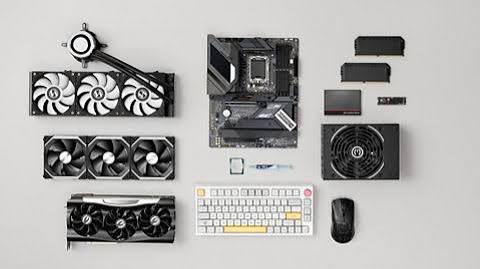
Gaming performance is determined by the combination of components that form the gaming system, with different components mattering more or less depending on the type of game being played. The GPU (graphics processing unit) renders the 3D graphics of most games and is the primary determinant of visual quality and frame rate in graphically demanding titles — the component that most gaming hardware discussions centre on because its impact on gaming performance is most visible and most directly related to the visual experience. The CPU (central processing unit) manages game logic, physics, AI, and the many non-graphics computations that games require — the component whose bottleneck shows up most clearly in games with large numbers of entities and complex simulation.
The gaming hardware configuration that most frequently creates a bottleneck: the mismatched system where one component significantly outperforms the others, preventing the slower component from being fully utilised. The GPU that can render at 200 frames per second in a game where the CPU can only deliver simulation data at 100 frames per second produces 100 frames per second — the GPU’s additional capability is wasted because the CPU cannot keep up. The balanced system whose CPU and GPU are well-matched for the target resolution, settings, and game types extracts more performance from both components than the unbalanced system where one significantly dominates.
GPU Selection: The Component That Defines Gaming Capability
The GPU market that gaming hardware buyers must navigate in 2025 offers products from two primary competing architectures: NVIDIA’s GeForce RTX series and AMD’s Radeon RX series. NVIDIA’s competitive advantages include the DLSS (Deep Learning Super Sampling) technology that uses AI to render at a lower resolution and upscale to the display resolution, recovering frame rates at a quality level that approaches or matches native rendering at no quality cost, and the ray tracing performance that produces realistic lighting effects in supported games. AMD’s competitive advantages include typically better price-to-performance in rasterisation workloads (the traditional rendering approach used in the majority of games), and the FidelityFX Super Resolution (FSR) technology that provides similar upscaling capability to DLSS but without requiring specific hardware and supported by a broader range of games.
The GPU specification that most directly determines whether a specific GPU is appropriate for a specific gaming resolution target: the Video RAM (VRAM) capacity. Games at 1080p with moderate texture quality settings typically require 6 to 8 GB of VRAM; at 1440p with high settings, 8 to 12 GB; at 4K with maximum settings, 12 to 16 GB or more. The GPU that runs out of VRAM is forced to swap textures from system RAM, producing the severe frame rate drops and stuttering that make games unplayable regardless of how capable the GPU is in other respects. Choosing a GPU with adequate VRAM for the intended resolution and settings is the GPU selection discipline that most prevents the disappointment of a capable GPU underperforming due to memory constraints.
Monitor Selection: The Display That Determines What You See
The gaming monitor specifications that most determine the gaming experience: the refresh rate (the number of times per second the monitor updates the image, measured in Hz — a 144 Hz monitor updates 144 times per second, producing noticeably smoother motion than the 60 Hz standard of most non-gaming displays, with 240 Hz and higher providing additional smoothness that competitive FPS players find valuable), the response time (the time required for a pixel to change from one colour to another, measured in milliseconds — lower response time reduces the motion blur and ghosting that slow-responding panels produce), and the panel technology (IPS panels provide better colour accuracy and viewing angles; VA panels provide better contrast ratios; TN panels provide the fastest response times at the cost of colour quality and viewing angle).
The gaming monitor feature that most improves the gaming experience for players whose GPU cannot consistently hit the monitor’s maximum refresh rate: the variable refresh rate technology (G-Sync from NVIDIA, FreeSync from AMD, and the VESA Adaptive Sync standard that underlies both) that synchronises the monitor’s refresh rate to the GPU’s output frame rate rather than refreshing at a fixed interval. The game that runs at 80 to 110 frames per second on a 144 Hz monitor without variable refresh produces screen tearing — partial frames visible simultaneously — that variable refresh eliminates by matching the monitor’s refresh to the GPU’s output. The elimination of screen tearing without the input lag of V-Sync makes variable refresh rate one of the most impactful gaming display features available.
Peripherals: How Mice, Keyboards, and Headsets Affect Performance
The gaming peripheral category whose specifications most directly affect competitive performance: the gaming mouse. The mouse sensor’s DPI (dots per inch) setting determines how far the cursor moves per unit of physical mouse movement; the polling rate (how frequently the mouse reports its position to the computer, measured in Hz) determines the smoothness and precision of the tracking; and the switch actuation force and pre-travel determine the responsiveness and consistency of the click. The gaming mouse at 1000 Hz polling rate and an accurate optical sensor performs meaningfully better for precision aiming tasks than a standard office mouse at 125 Hz with a mediocre sensor — and the difference is perceptible in competitive play even for non-professional players.
The gaming keyboard specification that most affects gaming performance: the switch type and the keyboard’s anti-ghosting or N-key rollover capability. Mechanical keyboard switches (Cherry MX, Gateron, and many others) provide tactile or auditory feedback that confirms each keypress, and the consistent actuation force across all keys ensures that every key responds the same way — both useful for gaming consistency. N-key rollover — the ability to register simultaneous keypresses of any number of keys without losing inputs — ensures that the movement, ability activation, and other simultaneous inputs that games require are all registered correctly. The standard keyboard without N-key rollover may fail to register multiple simultaneous keypresses, producing missed inputs at exactly the moments when input accuracy most matters.
Console vs PC: The Enduring Debate
The console versus PC gaming comparison that most honestly serves those trying to decide between them: the consoles (PlayStation 5, Xbox Series X, Nintendo Switch) offer a consistent, curated experience at a fixed price — every game runs on the same hardware, no driver updates or compatibility research is required, and the upfront cost includes the complete gaming hardware rather than a collection of components to research and purchase separately. The PC offers the flexibility to upgrade individual components, access to the largest game library, modding capability, the best performance at the top end, and compatibility with non-gaming uses — at higher entry cost, higher complexity, and ongoing maintenance that consoles do not require.
The gaming hardware investment philosophy that most efficiently allocates budget across the console-or-PC decision and the component-or-peripheral decision: buying the platform and tier that matches the specific games and experiences most important to the buyer rather than the platform with the highest specifications. The competitive FPS player who values mouse and keyboard controls and 240 Hz monitor gaming has a clear case for PC; the player who primarily plays PlayStation exclusives and prefers couch gaming with a controller has a clear case for PS5. The person who values both has a harder choice but can often find that one platform covers the majority of their library with the other supplementary rather than essential.